

Your SEO agent for WordPress
Cleo gets you. She writes your articles, sharpens your copy, watches your rankings in Google and AI, and repairs what's broken. Your whole SEO stack, in one plugin.
The client rings on a Tuesday.
A link on their contact page goes nowhere. It broke three weeks ago, on a site you last opened in March.

You are the last to find out about errors
Two service pages have dropped out of Google, or a form has stopped sending enquiries. Errors don't just announce themselves. You first hear about it from an irate client on WhatsApp at 11pm. Or even worse, from nobody at all.
See What Cleo Checks

The writing never happens
Everyone agrees the site needs new articles and content. Everyone has agreed on that for a year. One decent piece of content can eat an afternoon, and one page on its own doesn't move the needle, so it keeps sliding to next month.
How The Writing WorksA login and a bill for everything

Rank tracking is a pain, and checking AI visibility costs a bomb. Each plugin or scanner has it's own dashboard to navigate, and it's own settings to configure. Yet none of them actually fix a thing. You have to pay someone to do that too.
What Cleo Replaces

A hundred location pages. Your layout. Not one of them thin.
Build a location or service page once in Elementor, exactly as you want it. Cleo makes the rest in a flash.
-
Mark It As A Blueprint
Cleo stamps it for every town and every service the business covers.
-
Written, Not Swapped
Each page is written for that place, rather than find-and-replaced.
-
She Checks For Duplicates
Anything too close to a page she's already made doesn't get published.
-
Your Design Survives Intact
Only the words change. And the images, but only if you want new ones.
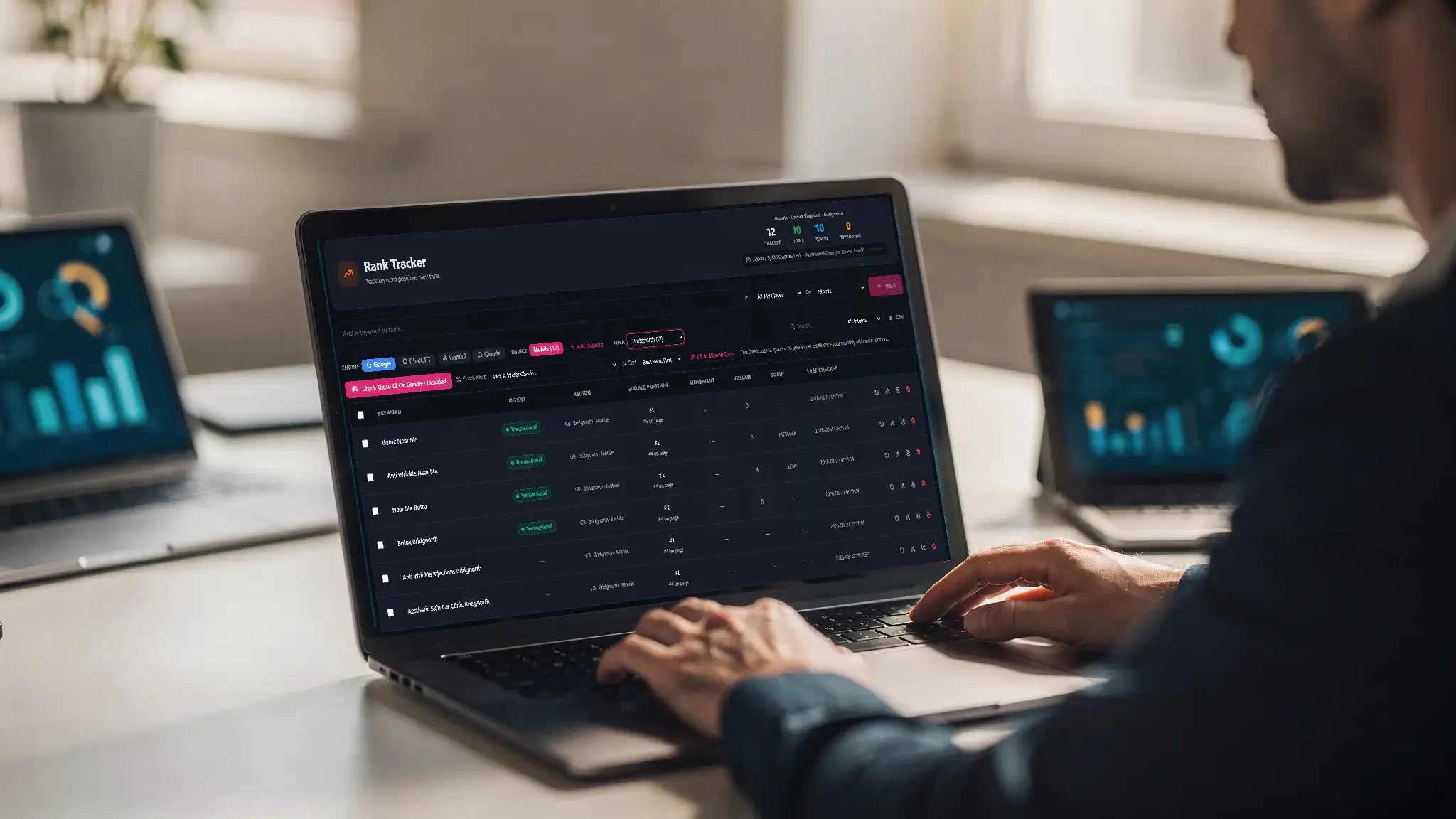
Rank Tracking Numbers That Actually Apply To Your Towns.
National keyword tools tell a plumber that "emergency plumber" gets 8,100 searches a month. It doesn't. Not in their town. Not even close.
-
Over 100,000 Towns Mapped
Cleo works out what a search means in a town that size, in that country.
-
Tracked Town By Town
Every place the business serves, not just a nationwide average.
-
Straight From Your Knowledgebase
The towns come from what you filled in once. Nothing to set up twice.
-
Content Worth The Afternoon
She suggests what to write against real local demand, not a national figure.

Autopilot, Semi, Or Advise.
Most SEO tools put a red dot next to an problem and make endless to-do lists.
-
Autopilot
She decides, applies and reports progress. No approval gate.
-
Semi
She proposes content and fixes, you confirm, she applies.
-
Advise
She suggests things, but nothing changes without your say so.
-
Full Cost Control
Anything running unattended has a monthly budget it can't go past.

Articles That Reflect You.
AI writing can fall down. It's often it's way too generic and reads like a wall of text.
-
Create a full knowledgebase about the business
What they do, who they serve, and how they talk about it.
-
Phrases They'd Never Use
Give her the words to lean on, and the ones to leave alone entirely.
-
Real Work And Clients, Not Invented Examples
A job they did, the numbers, what the customer said.
-
A Proof Bank That Evolves
Experience grows. Add it to her knowledge. Showcase it in your content.

AI Reads Your Site Content Too. Cleo Writes For It.
Google and the AI don't read your page the way a person does. They read what's underneath.
-
The Whole Business, Not Just A Name
Every branch with its own hours, every service linked to its page, every member of staff with the body that registered them.
-
Worked Out Per Page
She picks the right description for each page herself, and you can override it where you know better.
-
A Clean Copy For AI
Assistants get a plain text version of the site instead of guessing from the layout.
-
They Can Ask, And They Can Book
An assistant can look up your services, search the site, and send an enquiry straight to your inbox. Or read only, if you'd rather take control.
What Cleo does while you're working.

The blog finally happens
Plan a month ahead on the calendar and write on the days you choose. Eight kinds of article from how-to's, to case studies, to comparisons. All with your choice of intent. Each article saves as a draft for you to review, or goes straight up on the site.
How the writing works →
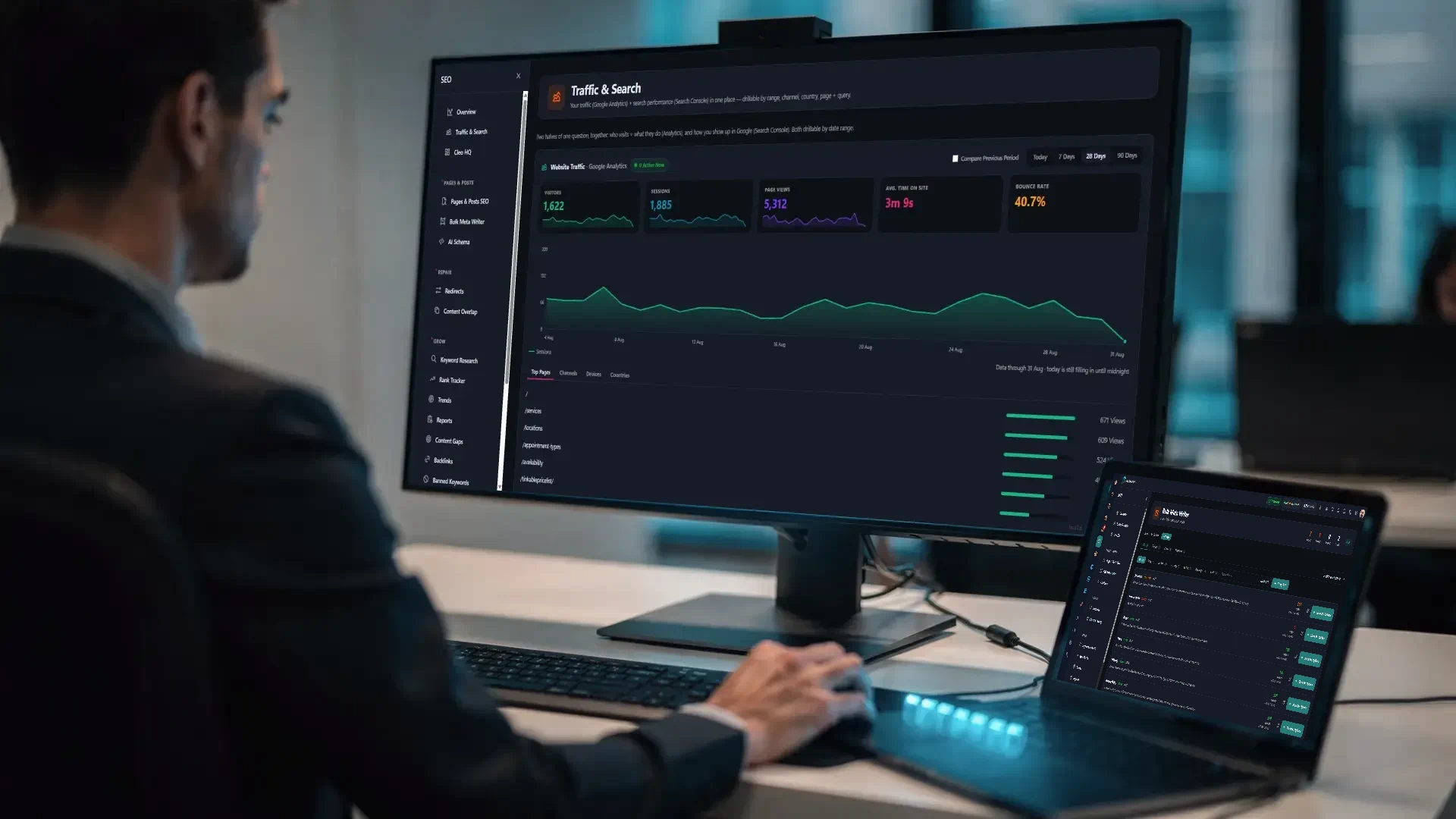
You stop checking multiple tools
Connect Google Analytics and Search Console. On one screen you can see who visited your website, what keywords you came up for, and where you sat in Google search. Both halves of Google tracking on one screen. Cleo acts directly on this real world data.
See what she tracks →

Those broken links are found
Hidden broken links are exposed. Redirect hops only found server side are uncovered. Checks run continuously, on any the page as a visitor sees it. Any broken content your page builder added or someone left behind gets found.
See what Cleo checks →

She finds new topics
Cleo is not just a keyword tool. She reads your Search Console account for the searches you almost rank for, the questions people ask that you have no page about, and the pages competing with each other. Then she suggests what to write next.
Where topics come from →

Nothing broken or unfinished
Create pages where the focus keyword always makes it to the title. Banish articles that read as a wall of text. Say goodbye to oprhaned pages. Cleo does more than work on faults. She also improves pages so new content actually moves the needle.
See content quality →

What to do next, in order
Every suggestion is ranked by what it's worth against what it takes, with the reasoning and the source. Act on it, put it off for a month, or tell her never to mention it again. She alerts you to new opportunities helping you to steer content in great new directions.
See the advice centre →

Two Decades Of Reports. Now The Work Gets Done.
Presstack was built by someone who spent twenty years on the receiving end of SEO tools.
"Every tool I ever bought told me what was wrong. A list of broken links, a list of missing descriptions, a list of pages nobody could find. Report after report was mounting up. Educating clients on these reports was a nightmare. Twenty years of that, across hundreds of sites, and the reports were never even the hard part. Finding the time to actually act on them was. So I built the tool that acts on it all."

Simon Parker Twenty years in SEO. Built Presstack.

The questions people ask first.
-
Everything except writing content , image generation, and fair use rank tracking overage.
Titles and descriptions, image descriptions, telling Google what the business is, every check and every fix, keyword research, rank tracking up to your monthly allowance, the advice centre, the reports. None of it is counted or charged for.
Plus you get 250 credits per month on Core and 500 credits a month on the theme version.
Credits are used for four things:
- Articles (4 credits)
- Generated images (2 credits)
- Page copy written for you (variable)
- Rank checks beyond the monthly allowance.
-
If you let them.
Presstack publishes a plain text version of the site and a machine readable card of the business. Every branch with its hours, every service with its page, every member of staff with the body that registered them.
An assistant can look those up, search the site, and send an enquiry straight to your inbox, with the same spam filtering as your contact form.
Turn the enquiry part off and they can read but not write.
What any given assistant chooses to do with that is up to them. What we can do is make sure your site is legible rather than something they have to guess at.
→ AI discovery
(link) -
You get 5,000 rank tracking queries a month.
A query is one keyword checked in one place. So ten keywords across ten areas is 100 queries for a full check. You'd have to be tracking a great deal to run out. AI citation checks work differently. They run real searches against ChatGPT, Claude, and Gemini rather than reading anything stored, so each one costs 20 queries.
If you go past the allowance, you can keep checking using credits. The app shows you where you are at all times.
→ Allowances and limits
/pricing/limits/ -
That's a choice on every article, not a setting you make once and forget.
When you plan a post you pick how it saves. It could be as a draft for you to read, or live on the day it's scheduled. You can set a default for scheduled runs and still override it on any individual piece.
If you're writing for a client who wants sight of everything, save everything as drafts. If it's your own site and you trust the plan, let it publish.
→ How the writing works
(LINK) -
No.
When Cleo rewrites a page built in Elementor, Gutenberg, Divi, Avada or WPBakery, she changes the words inside the layout and leaves the layout itself alone. Your columns, spacing, widgets and images stay exactly where you put them.
On those builders she shows you the before and after first, and won't write anything until you've seen it. That preview isn't optional. It's built in, because a surprise rewrite on a live client site is the one thing nobody forgives.
→ How page rewriting works
(LINK) -
Yes, and you don't have to find it first.
Every change is listed with the date, what it was, and which page it happened on. Each one can be put back the way it was with one click.
That includes things she did on autopilot. Autonomy changes who decides, not whether it's reversible.
→ The activity log (LINK)
-
Whatever you've told her she can do, and no more.
Six areas: SEO maintenance, business information, writing, inbox replies, Google Business Profile monitoring, and settings, each set on its own to one of three modes.
Autopilot means she decides, applies, and reports. Semi means she proposes and waits for you to confirm. Advise means she suggests and nothing changes at all.
Out of the box, writing and customer replies are on advise.
Nothing gets written or sent until you move them.
Anything she does can be undone, and everything she's done is listed with the date it happened.
→ How the settings work (LINK)
-
Credits are what Cleo spends when she makes something.
An article costs four credits. A generated image costs two, depending on quality. A rank check costs one query from your allowance, and you get 20 queries per credit. AI answer checks cost 20 queries (1 credit per check).
Rank checking is only physically charged after your monthly credit allowance is exhausted.
You can buy more at any time, and they don't expire at the end of the month.
Planning is always free. Cleo shows you what she intends to write and exactly what it will cost before you confirm anything.
→ How credits work (LINK)
-
Two things.
Anything running unattended has a monthly ceiling you set, per job. Cleo shows you what's been spent this month, what's left, and what the next run will cost before it runs. When the ceiling is reached, that job stops until the next month or until you raise it.
Finding work is always free. She only charges when she actually makes something - never for looking, scanning, checking or suggesting.
→ Spending limits
(LINK) -
Every site has its own subscription and its own allowance.
There's no shared pot to run dry, and nothing one client uses affects another. A busy site can't eat the budget of a quiet one.
Each site is billed separately, so you can pass the cost through per client, or absorb it, whichever suits how you charge. You can however, switch credits between clients if there is an overage of credits on one site. You can do this in your Presstack dashboard.
→ For agencies (LINK)
-
The website keeps working. All of it.
Every page and post stays exactly as built. The design stays, and all the essential SEO work done keeps running including the titles, descriptions, canonicals, schema, sitemap, and redirects. Google sees no difference at all.
You can still edit every SEO field by hand on every page, for as long as the site exists.
What pauses is Cleo herself - The writing, the checks, the rank tracking, the ongoing content, scheduled blogs, and the reports. She starts again the moment you resubscribe.
You can, if you wish, simply subscribe for a month, make a website using credits and allowances, and then if you want a static website, simply unsubscribe. You can then perform maintenance with Cleo at any time in the future by resubscribing.
-
No. Cleo brings it across from any of the three.
Titles, descriptions, focus keywords and noindex settings all transfer. You see exactly what will come across before it does, and nothing you've already written gets overwritten.
Nothing is deleted from the old plugin either. If you turn Presstack off, it's all still there.
And if the old meta arrives full of
%title%or%sitename%placeholders, which happens more often than anyone admits, one button turns them into real text without re-importing.Redirects can also be carried over that you stored in these plugins via the redirect tool as well.
→ Switching from your SEO plugin
(LINK) -
Presstack Core is a plugin. It goes on the site as it is and leaves the theme and page builder alone.
Presstack Theme is the other version. It becomes the website, and brings a design system, template control for every page type, elementor page builder add-ons, and design blocks with it so you can make a full website with the theme version. It also gives access to our additional EC Pro and Pro widget add-ons.
Both do all 133 things. The theme adds the shop tools, the inbox, and the design side.
The theme version comes with an allowance of 500 credits per month, double that of the plugin version.
→ Compare Core and Theme (LINK)
-
In each site's own WordPress database.
Articles, business details, rankings history, the record of every change she's made - all of it sits on the site itself, not in a dashboard you rent.
Writing an article and checking rankings happen outside, because that's where the models and the search data are. But what comes back is stored with you.
If you stop paying, you don't lose access to your own work or data.
→ Security and data (LINK)
-
As many as the business has towns and services.
Build one page in your builder exactly as you want it, mark it as a blueprint, and Cleo writes a version for each place and each service. The layout is identical every time. Only the words change, and the images, if you want new ones.
Each page is written for that town rather than find and replaced, and she won't publish one too close to a page she's already made. That's the thing that usually sinks bulk page building.
→ How blueprints work (LINK)
-
It does if nobody tells it anything.
So Cleo asks first - she actually interviews you. What the business does, who it serves, how it talks. Phrases it always uses, and phrases it must never use. Where it's been, where it is now, where it's going. It's all stored in your growing knowledgebase for her to draw from.
You can also give her the real work that you have done in the past. A job that was done, the numbers, what the customer said. For each one you decide whether the client can be named explicity, or appears as "a regional accountancy firm", and how firmly it may be stated.
She uses those where they fit and stays quiet where they don't. She doesn't invent examples and can even draw from external review sources too, once they are connected.
→ How Cleo writes
(LINK) -
If you want her to.
She groups your feeds into stories and won't write one until at least two independent outlets have covered it for confirmation. Then she writes an original article drawing on all of them ,and credits every source to avoid plagiarism and any copyright issues.
She doesn't rewrite one outlet's piece, which is what most automated news do, and why most of it gets ignored. She writes original content, in your voice, with your name.
→ News writing (LINK)
-
Not if you set it up properly.
You can give Cleo words she must never use on a site. It could be drug brand names for a clinic, "guaranteed" for a financial client, whatever the rules say. She won't target them or write with them.
Read the articles anyway. She checks her own drafts for out-of-date claims and holds anything doubtful back for you, but a banned list catches words, not implications, and she doesn't know your client's advertising code.
Save as drafts on those sites and read before publishing. That's true of any writing tool, ours included.
→ Banned keywords
(LINK) -
You connect Google Analytics and Search Console once, and after that you don't need to go and read them.
Who visited and what they looked at, what you came up for and where you sat - both halves on one screen, whether its today, last month or the past 3 months. Cleo tells you when the numbers aren't final yet, rather than pretending they are.
Then she acts on what's there. A page getting impressions but no clicks gets a better description. A page that's slipped gets refreshed.
Rankings are tracked on Google and Bing if you want to track them - that's both engines, not just Google.
For AI, she puts your customers' questions to ChatGPT, Claude, and Gemini, and tells you whether the business gets mentioned in the answer. She looks for the name as well as the link, because an AI answer recommending you writes your name rather than pasting a URL.
→ What she tracks
(LINK) -
No, and we won't pretend otherwise.
What happens in search depends on your competitors, the industry, and Google. None of the three take instructions from us. Anyone promising you rankings is guessing.
What Cleo does is the work that gets skipped including writing regularly, keeping the site sound, and telling Google clearly what the business does consistently. That's the part you control.
-
You get up to 5,000 rank tracking queries per month. You could have 10 keywords in 10 areas and this costs 100 queries for a full check. AI is different in that real web searches are completed to check citations using tokens. These cost 20 queries per check. You can check unlimited queries over your allowance using credits, which you can see within the app.
-
No.
Cleo handles what slows a page down at the source such as oversized images, scripts loading before they're needed, stylesheets held inline, and measures the results afterwards.
Caching, minifying and content delivery are a different job. Keep what you have. She'll tell you when a page has gotten slower and why, but she isn't trying to be WP Rocket.
→ Speed checks
(LINK) -
Quite a lot, and we'd rather say so.
It doesn't post to Google Business Profile. It reads the listing and tells you when your name, address or phone don't match the site. It doesn't post to social media or send marketing email. It doesn't move a site off one page builder onto another.
There's no Siri ranking to track, because Siri reads Apple Maps and gives one answer rather than a list. Anyone selling you a Siri position is selling you nothing.
→ What it doesn't do (LINK)
-
Only if you want them to.
The monthly report goes out with your logo and your colours on it, scheduled, straight to whoever you choose. Nothing in it mentions us.
Same on the site itself. Presstack doesn't add a credit line, a badge, or a link back to us anywhere a visitor can see.
→ For agencies
(LINK)
Try her out and see what she finds.
Pick the client site you've been meaning to get to. Cleo reads it, works out most of what she needs, and comes back with a list. Looking costs nothing.