
Tell Cleo About Yourself Once. Everything Else Runs On It.
It's all about you. Who you are, what you do, where you work, who works for you and how you sound. Cleo drafts most of it from your own website. Everything she writes, checks, and tells Google comes from here.

AI Content Can Read Like A Generic Wall Of Text. Yours Doesn't.
When AI writes about a business it doesn't know, the copy could belong to anyone. The knowledgebase changes that by making the AI all about you.
It holds your facts, your services, your places, your people, and how you sound. Everything Cleo produces is drawn from it. A section left empty stays empty. She won't fill it with guesswork, so the more you give her, the more precisely she writes.
-
Cleo Drafts It From Your Site
Press 'Let Cleo Fill It In' and she reads your home page and key pages, then drafts your description, services, selling points, areas, audience and voice. Only empty fields are filled, and nothing is kept until you press save.
-
The Gaps That Matter Most, First
Each week Cleo lists what is still missing, most useful first, with a line on what each gap is holding back. You fill the field that makes the biggest difference, not whichever sits at the top of the form.
-
Built As A Graph, Not A Guess
Schema that lists every branch, every service and every person become linked entries Google can read, using the most precise type available. Where no standard type fits, Cleo suggests a reference on Wikipedia or Wikidata and checks it exists before using it.
-
A Nudge Before It Goes Stale
When the knowledgebase hasn't been touched for a while, Cleo asks you to check it. New hours, a new service or someone new on the team gets recorded before the next piece of writing goes out.
Where Everything About The Business Lives.
The Knowledgebase as it opens. Hover a marker to see what each section covers.
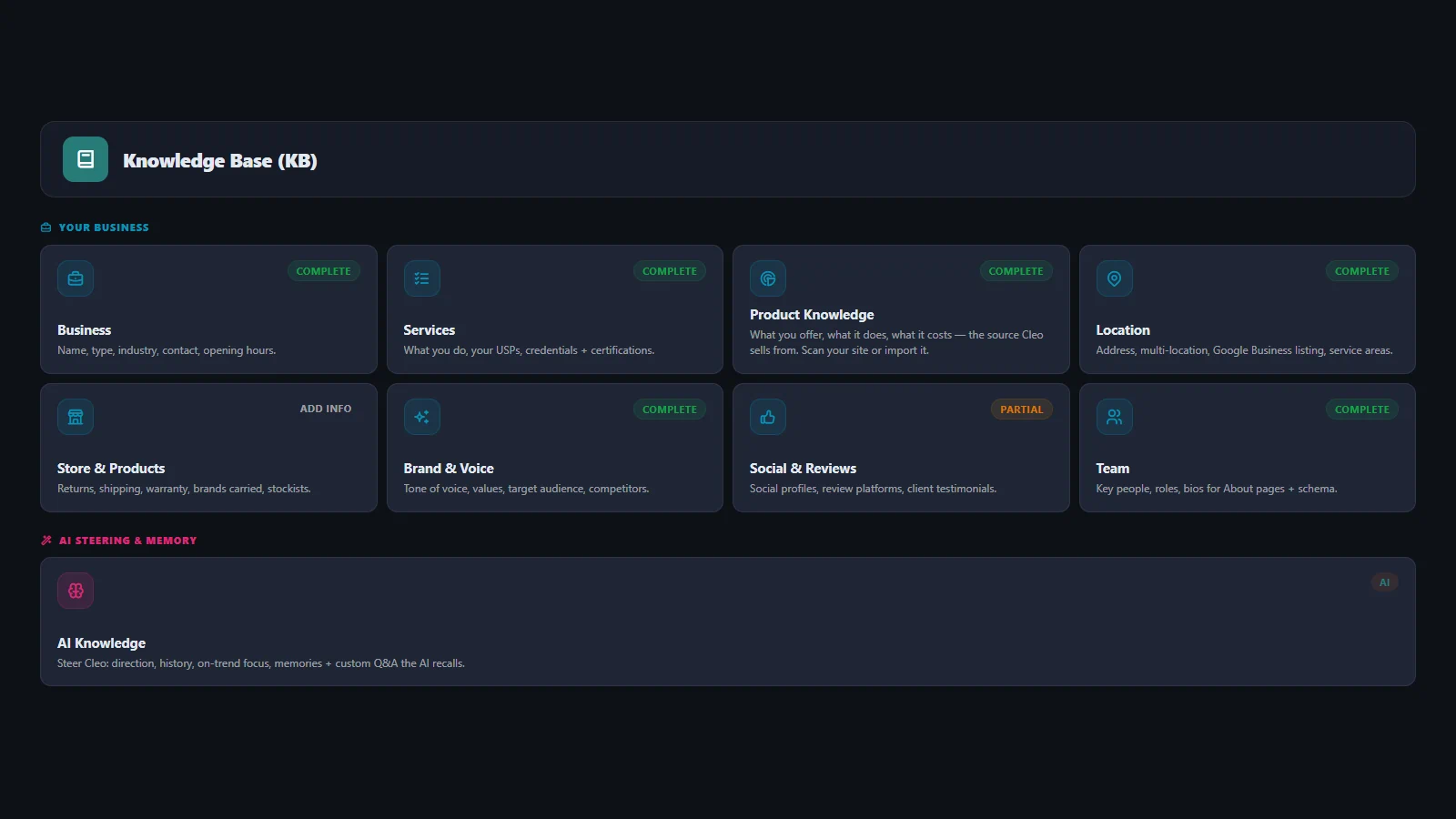
Business
Trading name, registered name, company type, industry, the year you started, company number, contact details and opening hours. The core facts every other section refers back to.
Services
Each service with its own description, what sets it apart, your credentials and the bodies that accredit you. What Cleo draws on when she writes about what you do, and what Google is told you offer.
Product Knowledge
What you sell, what it does and how it is used. A shop with this filled in gets product copy that is about the product, not a template reworded around a name.
Location
Your address, map position, Google listing and every town and country you work in. Paste your Google listing link and the address, map position and phone fill themselves. One branch or many, each with its own address, phone, hours and page.
Brand And Voice
How you sound, your values, who you write for and who you compete with. A ten-question interview sets the baseline, and you can fine-tune every line of it afterwards.
Social And Reviews
Your social accounts and your profiles on 36 review and directory sites, from Trustpilot and Yelp to Checkatrade, Yell and Clutch. Outside ratings are linked the approved way, never republished as your own.
Team
Who works for you, their role, what they are registered as, the body that registered them and their number. It turns a byline into a claim anyone can check.
AI Knowledge
Where the business has been, where it is now and where it is heading, what to lean toward, and the facts that must be right every time. Cleo uses it to steer what she writes, not to recite it.

Five Steps From Blank Form To A Business Google Can Read.
You don't need every section before Cleo starts. Begin with what she drafts from your site, then add what only you know. Every section shows its own status, so you always know what is left.
-
Step One: Let Cleo Fill It In
She reads your website and drafts the description, services, selling points, areas served, audience and voice. You check each one and change anything that is not right.
-
Step Two: Add What Only You Know
Your address and branches, opening hours, your team and their registrations. Paste a Google listing link and the address, map position and phone come in for you.
-
Step Three: The Voice Interview
Ten questions about how the business talks. Cleo turns the answers into the voice she writes in, with the words you use, the ones you never use, and what makes you different.
-
Step Four: Cleo Builds The Graph
As sections fill in, Cleo turns them into the linked description Google and AI assistants read. You never build it by hand, and it moves with your business when you edit.
-
Step Five: It Stays Current
Your Google and shop reviews are pulled in, Cleo lists any gaps each week, and she asks you to check the knowledgebase when it has not been touched for a while.
Everything You Can Tell Her.
Your knowledgebase feeds every piece of content on your site, from page titles to what Google sees. Every save is kept as a version, so you can revert if something goes wrong.
| Section | What It Holds |
|---|---|
| Business | Trading name · registered name · type of business · industry · year you started trading · company number · VAT number · price range · description · photo · phone and out-of-hours phone · email, bookings email and enquiries email · website · WhatsApp · SMS · Telegram · opening hours, including open all hours |
| Services | Every service with its own description · what sets you apart · credentials and certifications · accreditations and memberships |
| Product Knowledge | What you sell, what it does, and what Cleo draws on when she writes about it |
| Location | Address · town, county, postal code and country · map position · your Google listing · one branch or several, each with its own address, phone, hours and page · every town and country you work in · a switch for online-only businesses with no address to publish |
| Store & Products | Returns, shipping and warranty · care and materials · brands you carry · where to buy |
| Brand And Voice | How you sound · brand values · who you are writing for · who you compete with · the voice interview |
| Social & Reviews | Social accounts · 36 review and directory sites · other listings that mention you · client testimonials |
| Latest Reviews | Your real Google reviews and your own shop reviews, pulled in and refreshed |
| Team | Each person's name and role · their profiles · what they are professionally registered as · the body that registered them · their registration number · a short biography |
| AI Knowledge | Where the business has been, is now, and is heading · what to lean toward · what to ease away from · the facts to always get right · anything else she should know |
The Difference Is In What's Sent, Not What's On The Page.
Presstack builds your business Schema once, keeps it live across Google and AI, and updates everywhere when you make a change. There's no more typing the same thing into different places and then watching it fall out of date as the business evolves.
| A Typical SEO Plugin | Presstack | |
|---|---|---|
| How Your Business Is Described | One flat entry, typed by you | A joined up map, worked out from what you've filled in |
| How Precisely You're Described | A short list of business types | The most precise description available, with an outside reference where there isn't one |
| Whether That Reference Exists | Nobody checks | Fetched and checked before it's used. Unverifiable ones are left out |
| Your Location | One address, or a branch that's a homepage | Every branch, each with its own address, phone number, hours and page |
| Working From Home | Your address published anyway | A switch that describes you without one |
| Your Service Areas | Rarely handled or a page with find and replaced text | Every town and country, feeding the rank tracker as well |
| Your People | A name on a byline | Name, role, professional registration, registering body and number |
| Review Stars | Often republished as your own rating | Linked the approved way. Only your own shop's reviews are published as yours |
| Keeping It Current | Until you remember | Reviews pulled in, and a nudge when it hasn't been checked for a while |
| Get Started |
The Knowledgebase In Depth.
Filling It In
The same prompt, run with a complete Knowledgebase and then without one. The difference in output is obvious.
Content

AI Search
Whether ChatGPT, Gemini or Claude can say anything accurate about you depends almost entirely on what lives here.
AI Search

Getting Found On Google
What search engines are told about your business is built directly from these fields.
Getting Found

Building Pages
She compares the services and areas you have listed against the pages you have actually got.
Page BuildingFrequently Asked Questions

-
With the button that fills most of it in for you.
Press Let Cleo Fill It In and she reads your website, then drafts your description, services, selling points, areas, audience and voice. Only empty fields are filled, and nothing is kept until you press save.
Then add the facts only you know: your address (paste your Google listing link and the address, map position and phone come in), opening hours and team. Brand and Voice is a ten-question interview rather than an empty box. Every section shows its own status, so you can do three today and three next week and always know what is left.
-
It works, and the half you have done still does its job.
A section that is empty simply is not sent to anybody. You do not get a description full of blanks. What you lose is the specificity that section would have added. Half-filled gives you half the benefit, and it shows most in the writing.
The best order to work through it is Business, then Services and Location, then Brand and Voice. Those four sections give you most of the benefit. Team and AI Knowledge are where the last stretch of quality comes from.
-
A joined-up description of your business, built from what you have filled in.
Not one flat entry with your name and an outdated category, which is what most plugins send. Your business, your branches, your services, your people and their registrations all become separate, linked things with the relationships between them stated. That is the form in which the question is actually being asked.
You do not build any of it by hand. It is worked out from the Knowledgebase and kept in sync, so your schema moves with your business rather than sitting still from the day it was set up.
-
Not if you tell it not to. There is a switch for exactly that.
Turn on the online-only setting and your business is described without an address, coordinates or opening hours. You can still fill those fields in for your own contact page and footer. They are simply not published as facts about you.
It does a second useful thing. Telling Google you are at a particular address makes you look like a local business, which works against you if you are selling nationally. The switch protects your privacy and stops you sending a signal that fights what you are trying to do.
-
No, and this is one of the more subtle parts of the Knowledgebase.
Cleo finds the most precise standard description available for your trade. Where one does not exist, and it often does not, she points at an outside reference page that does describe what you are, and she checks that page resolves before saving it. If it does not, she reports it and leaves the field empty rather than publishing a broken reference.
-
She can show the reviews. She will not republish their stars as your own rating, and you should be wary of anything that does.
Google's guidelines do not permit a business to take ratings collected on Google or another review site and republish them as its own rating in the code of its pages. Doing so risks a manual action against the site, and plenty of plugins do it anyway because the stars look impressive.
Your review profiles are linked the approved way, which lets each site display its own rating. The only rating published as yours comes from reviews left on your own shop, which is permitted. Displaying live Google reviews on a page is fine, and there are widgets for it. Claiming them as your own business rating is the part that is not.
-
Because writing attributed to a qualified person carries more weight than writing attributed to nobody, with search engines, with AI answers, and with the person reading it.
Each team member can carry what they are registered as, which body registered them, and their number. For bodies Cleo recognises, she adds the register's own website to what Google is told. For a clinic, a practice or any regulated trade, that is the difference between an article that reads like marketing and one that reads like it came from somebody qualified to write it.
-
Steering, in your own words.
Three short paragraphs on where the business has been, where it is now and where it is heading, so the site reads like something current rather than written once and left. What to lean toward and what to ease away from, as preferences rather than rules. And the handful of facts you want right every time, such as a name, a spelling, or the way you talk to your customers.
Cleo uses it to colour what she writes rather than to recite it. Custom entries hold the specifics, like your booking lead time or your returns policy, so they come out right whenever she writes about them.
-
Your previous version is kept each time you save.
If a save goes wrong, you can put the last version back. That said, back the site up before installing any plugin that writes to the database. Cleo can undo the changes she makes to your pages, but neither of those is a full site backup.
-
No. The Knowledgebase is in both versions.
Presstack Core is a plugin. It goes on your site as it stands and leaves your theme and page builder alone. Presstack Theme is the other version, and it becomes the website, with its own design system, template control for every page type, a page builder and widgets. Both include the full Knowledgebase.
-
Once per site. Each site is a different business.
Cleo does the first draft each time: press Let Cleo Fill It In on the client's site and she reads it for you. The address comes from their Google listing link, their reviews come in on their own, and the voice section is an interview rather than an essay.
Agencies generally do the first one properly, see what it does to the output, and settle into their own routine from there.
-
The Knowledgebase stays. It lives in your own database, and you can edit every field of it by hand for as long as the site exists.
What has already been sent to Google about your business stays sent. What pauses is Cleo reading from the Knowledgebase to write new things. Your website keeps working. Cleo pauses.
Tell Her Once, Or Get Generic Copy Forever.
Put it on your own site and press Let Cleo Fill It In. Check what she drafts, ask for an article, then look at what Google is told about your business.