

Design One Page In Your Page Builder. Cleo Builds The Rest.
Build a page in your page builder like Elementor or WP Bakery the way you want it, and mark it as a blueprint. Cleo stamps it for every town or service you cover. Each page draws on your knowledgebase. None of them end up saying the same thing.

Page Building Without Cleo.
Every item below is work that gets skipped in practice, not because agencies do not care, but because doing it properly by hand takes more time than most projects allow.
-
Designing the Layout
Done by hand, you build each location or service page individually, recreating the same structure every time. One section out of place and the whole set loses its consistency. With Presstack, you build the layout once in Elementor, mark it as a blueprint, and Cleo stamps that exact structure onto every page drawn from it.
-
Keeping Every Stamped Page Consistent
When you change a heading style or add a section to one location page by hand, you then have to change every other page in the set. Forty pages means forty edits. With Presstack, you update the blueprint and stamp the revised version.
-
Writing Copy That Differs Per Town
The real risk with bulk pages is content that is identical apart from the town name. Writing genuinely different copy for twelve location pages by hand takes hours, and most of that time gets cut. Cleo draws on your knowledgebase to write content that reflects the specific location or service, then checks each page against what already exists before it goes anywhere near publication.
One Layout, Every Town.
A blueprint on a real site, with a page stamped from it. Hover a marker to see what each part does.
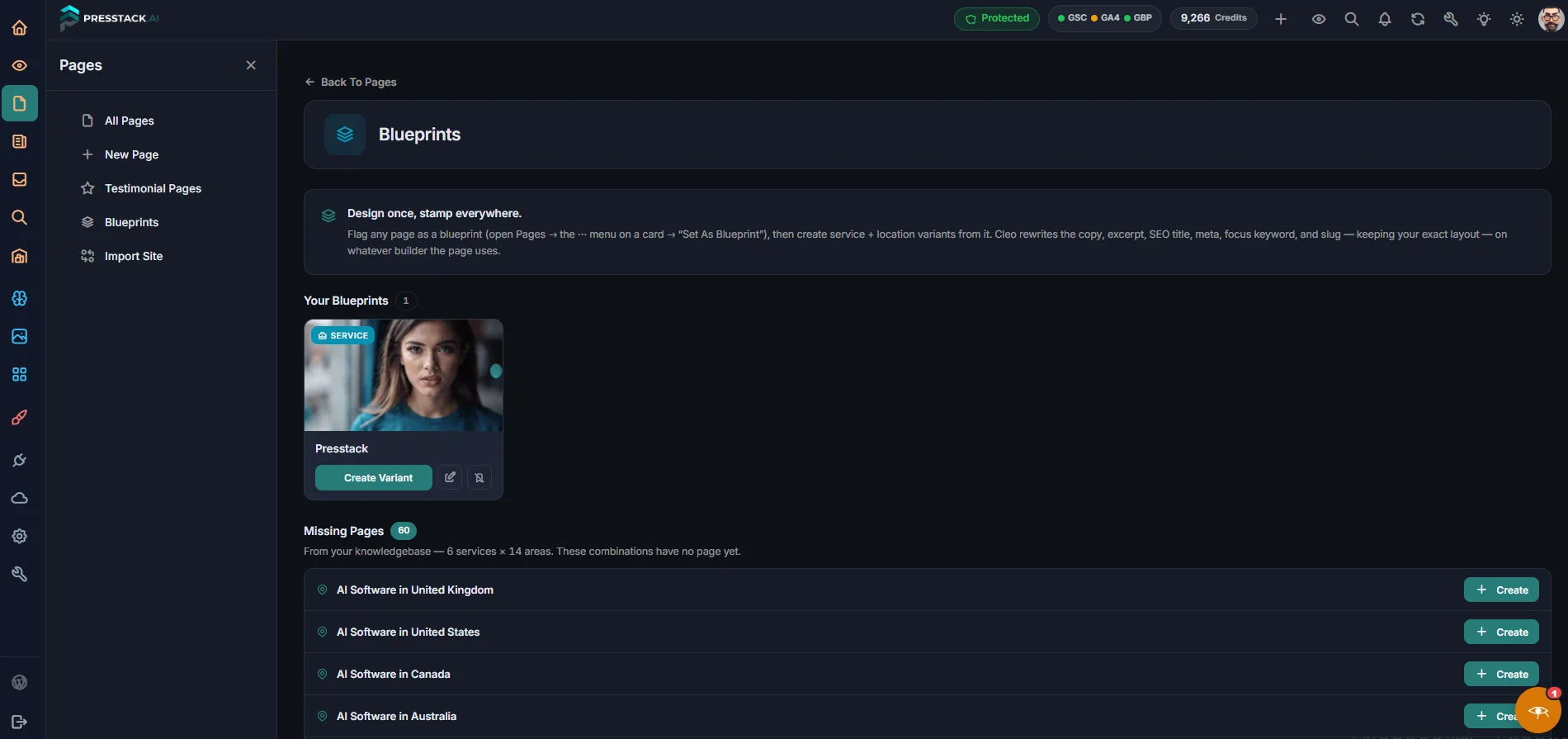
The Page You Built
An ordinary page, designed however you like in Elementor. Nothing marks it as a blueprint until you say so from the page list.
Mark It As a Blueprint
You do this from the page card on your list of pages. The original stays a normal live page. Editing it later does not alter pages already stamped from it.
Tell Cleo What You Need
A small prompt appears. You describe the page in plain words, which town, which service, anything specific to include. She builds it using that and your Knowledgebase.
The Structure Stays Fixed
Every stamped page carries the same layout as the one you designed. Cleo changes what is inside the sections, not the sections themselves.
Add More Any Time
Need two more towns next month? They get the same layout, matching every page already stamped from that blueprint.
What Cleo Does, and What She Calls It.
Blueprints and page building work in both Presstack Core and Presstack Theme, and in whichever page builder you already use. Writing page copy uses credits. Cleo shows the cost of a run before you confirm it, including for a batch, so twelve pages is costed before it starts rather than after.
| What It Does | Plain English |
|---|---|
| Building | |
| Build a page from a description | Tell her what it is for and what goes on it. Built in your page builder. |
| Rewrite the words on a page | The layout is untouched. Draft shown first. |
| Stamp a page from a blueprint | Your layout, filled from your instruction and the Knowledgebase. |
| Bring a page up to date | Refreshes what is out of date rather than starting again. |
| Blueprints | |
| See your blueprints | The layouts you have marked, and what has been stamped from each. |
| Repurpose a page you already have | The layout you built for one service becomes the start of the next. |
| Checking | |
| Check a page over | Four checks run before she considers it finished. |
| Check it persuades | Whether it makes a case, not just a description. |
| Check the next step is clear | Whether somebody knows what to do at the bottom. |
| Check it is not a near-duplicate | She refuses to publish a page too close to one you already have. |
| Keeping Track | |
| List your pages, with how each is doing | So the quiet failures are visible. |
Building pages across forty locations, keeping every one distinct.
The standard objection to bulk page building is that you end up with near-identical pages. Cleo compares every candidate against the pages already on the site before it publishes, so the objection is answered before the page exists.
| Done By Hand | With Cleo | |
|---|---|---|
| Designing the layout | Open each image, look at it, type a sentence. | Press one button, or do it unattended |
| Keeping every stamped page consistent | Nobody does this | The same button again |
| Writing copy that differs per town | The first fifty are good, the last fifty say "photo" | The two hundredth is like the first |
| Catching near-duplicates | You'll probably forget | Caught and described |
| Knowing which pages you still need | Search the library, give up, use a stock site | Your own library searched first, then use AI in one click |
| Changing something across forty pages | A stock subscription, or a separate tool | One Click AI |
| Seeing what a change looks like first | A compression plugin taking over everything | Found individually, with the page they're on |
| Knowing which pages are working | Re-upload from wherever the original is | One click. The original was kept |
| Adding two more towns next month | Not practically possible by hand | Listed, including ones inside your page builder |
| Bulk changes across many pages | Permanent, and you'd better be right | A bin. Bring it back if you were wrong |
| Get Started |
What sits alongside page building inside Presstack.

The Knowledgebase
Every page Cleo builds draws on the services and areas stored in your Knowledgebase. The more complete it is before you start, the less you have to specify each time you ask for a new page.
Knowledgebase

Writing And Content
The same duplication check that governs pages governs articles too. A piece of content that is too close to something already published does not get through, regardless of where it sits on the site.
Writing

Getting Found On Google
Each new page is a potential entry point from search. Whether it becomes one depends on whether it says something distinct, and that is precisely what the duplicate check is running.
Getting Found

Pro Widgets
Pages built from a blueprint still need the right components on them. Pro Widgets gives you the elements that carry the content once the page structure exists.
Pro WidgetsFrequently Asked Questions

-
No. The level of support depends on which builder you use, and Cleo is honest about that upfront.
On Elementor and WPBakery she builds new pages and repurposes existing ones, placing copy into the layout rather than alongside it. On Gutenberg, Divi and Avada she rewrites the words without touching the structure, and you see a before-and-after before anything changes. The blueprint system works across both Presstack Core and Presstack Theme.
If you are not sure which applies to your setup, open the page builder settings in Presstack and it tells you the mode it is running in.
Using Elementor's AI connector? See Presstack vs Elementor MCP.
-
A copy of a page you have already built, set aside as the starting point for future pages.
You build a page in Elementor to your own design. Presstack copies it, and that copy becomes the blueprint. The original stays live and untouched. Editing the original later has no effect on pages already stamped from it, and no effect on the blueprint itself.
When you ask for a new page, she fills the blueprint's structure with copy drawn from your instruction and the Knowledgebase. The result is your layout, not ours.
-
No. You see the before and after before anything goes live.
This matters most for bulk page work, because some page changes do not reverse cleanly once written. The safeguard is the preview, not an undo. Look before, not after.
Four checks run before she considers a page finished, overall quality, whether the page makes a case rather than just a description, whether the next step is clear to a reader, and whether the page is too close to one already on the site. If it fails the last one, she does not offer to publish it at all.
-
Writing copy uses credits. She shows you the cost before you confirm.
For a single page that is shown before the page is written. For a batch, the total is shown before the run starts, so twelve pages is not a surprise at the end. Viewing blueprints, running the duplicate check, and seeing the before-and-after preview are all included in the subscription and do not draw on credits.
-
Cleo compares what you offer against what you have published, and lists the gaps.
She reads the services and areas in your Knowledgebase, then checks those against the pages on the site. A plumber with eight service areas and six services might have forty-eight logical pages. If thirty exist and eighteen do not, she lists the eighteen. You decide which ones are worth building.
She does not decide priority for you. She makes the gap visible, because gaps you cannot see do not get filled.
-
Each site has its own blueprints, its own Knowledgebase, and its own page list.
An agency licence covers multiple client sites under one login. When you stamp a new page for a client, it draws on that client's Knowledgebase, so the copy reflects their services and areas rather than a generic fill. The duplicate check runs against that site's existing pages, not across all sites.
There is more on running Presstack across a portfolio on the agencies page.
-
Nothing. Pages already stamped from a blueprint are not affected by changes to it.
Each stamped page is its own published page from that point forward. You can edit the blueprint and those pages independently. If you want to bring an older page in line with a revised blueprint, the 'bring a page up to date' option handles that without rebuilding from scratch.
-
Yes. Any existing page can be set as a blueprint or repurposed directly.
If you have a service page that is already performing well, Presstack can copy it as a blueprint and stamp new location variants from that structure. Alternatively, the repurpose option rewrites the copy on a page without changing the layout, useful when a page exists but the words are no longer right.
Either way, you see the before-and-after before anything is written to the live page.
-
No. Everything on this page is in both versions.
Presstack Core is a plugin. It goes on the site as it stands and leaves the theme and page builder alone. Presstack Theme is the other version, becoming the website itself, with its own design system and template control for every page type. The blueprint system, the missing pages list, the duplicate check, and the before-and-after preview are all in both.
-
It shows you the current page and the proposed version side by side, before anything is written to the database.
For bulk page work this is the main safeguard. Some page changes do not reverse cleanly once applied, so the preview is more reliable than an undo. Read the proposed copy, check the structure looks right, then confirm. Nothing happens until you do.
-
Yes. The bulk change tool lets you apply the same instruction across as many pages as you select.
You write the instruction once, pick which pages it applies to, and she proposes the change for each one. You see a before-and-after for the batch before anything is confirmed. This is useful for updating a service name, changing a call to action, or removing copy that is no longer accurate across a set of location pages.
-
The missing pages list runs per site, so each client's gaps are separate.
Open the All Pages screen for a site and the list shows what has been built and what has not, based on the services and areas in that client's Knowledgebase. A client with ten services and six areas has sixty potential pages. If forty-two exist, you see the eighteen that do not. Showing a client that list tends to make the next conversation straightforward.
There is more on running Presstack across a portfolio on the agencies page.
-
Every page she has written or repurposed stays exactly as it is. The copy is in ordinary WordPress fields, on your site, under your control.
What pauses is her doing new ones. Your existing pages keep working. Cleo pauses.
See Which Pages You Are Missing Before You Build Anything.
Connect your site, open the missing pages list, and the gaps between your Knowledgebase and your published pages are there in front of you.