Website Health

Over 30 Checks, Every Day, Whilst You're Not Looking.

Websites break without announcement. A link dies, an image vanishes, a page gets switched off from Google. Nobody tells you until a customer does.

Google Asks Just Four Questions.
How Google Reads Your Site

Google Asks Just Four Questions.

Strip away the technical language and Google wants to know four things: Can it find the page, does it understand what you do and where, will people click it, and does it all stay consistent. Cleo, the AI built into Presstack, keeps all four in good order as the site grows and changes.

  • Can Google Find Every Page?

    Cleo finds pages nothing links to, pages buried too deep in the site, and pages switched off from search by accident, and brings each one back into reach.

  • Does Google Know What You Do And Where?

    Your services, opening hours and the towns you cover are written into the schema Google reads, straight from your business details. No code to write.

  • Will Anyone Click Your Result?

    Ranking without being clicked is a slow loss. Cleo rewrites weak titles and descriptions, with three options to choose from, to earn more clicks on positions you already hold.

  • Does It All Stay Intact?

    A single plugin update can undo months of work. The daily check looks at titles, descriptions, schema, links and redirects, and anything that breaks comes back to you with the fix worked out.

What You're Looking At

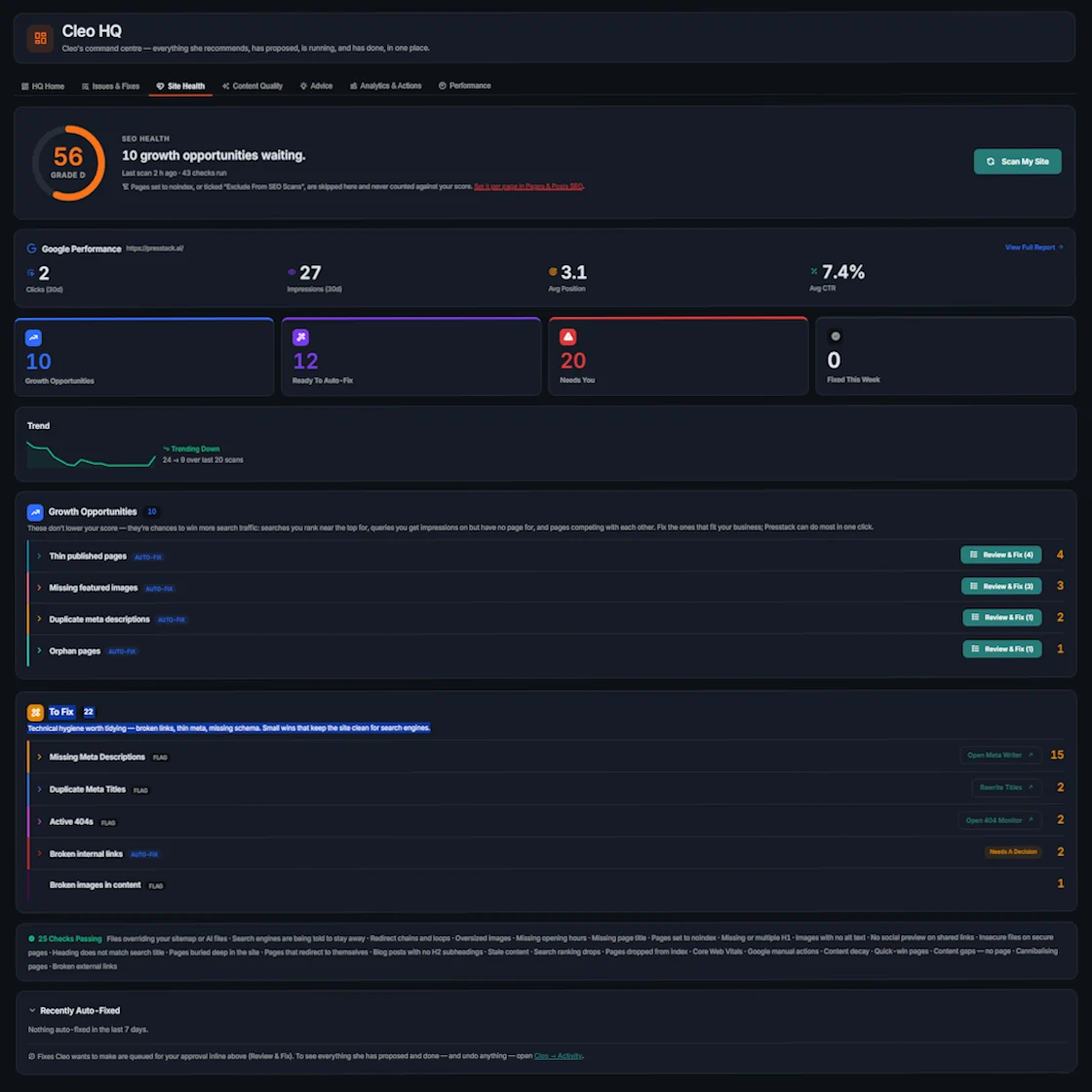
A Real Site, Checked By Cleo.

Cleo Health

The Score

One number showing how the site is performing technically, and whether that number is moving up or down.

Growth Opportunities

Not faults. Gaps the site could close, things like missing content, underused pages, or areas where a new post would do real work.

Ready To Auto Fix

Faults Cleo can clear in one click. Switch that area to Automatic and she clears them without asking.

Needs You

Changes that affect what the page says. Cleo drafts the fix and asks before applying it.

Fixed This Week

Everything cleared since your last visit, with your approval or automatically, each with the date.

Checks Passing

Every check she ran and found nothing wrong with. On a well-maintained site, most of the list sits here most weeks.

Trend

A spark graph showing whether site health has improved or declined over the past several weeks.

In This Section

How Cleo Keeps Your Site Healthy

0 +
Checks Every Day
0
Days To Undo A Change
0
Days Before Content Is Classed As Stale
0 kb
KB Threshold Where an Image Is Too Large
Cleo Notices. She Fixes. Then Keeps Watching.
Presstack SEO System

Cleo Notices. She Fixes. Then Keeps Watching.

It's the checking nobody gets round to. Cleo doesn't produce a report and leave the work to you. She works out the fix, makes it once you've said yes (or straight away, for the areas you've set to automatic), and the next day's check confirms it held.

Schema, titles, internal links, redirects and indexing settings, all checked every day inside WordPress, with no monthly retainer and no spreadsheet.

  • Schema Google Can Read

    Your business, its services and the places you work, described in the format Google reads. Built from your business details, kept current as they change, and flagged when it goes missing from a page.

  • Titles And Descriptions That Earn Clicks

    Cleo reads your Search Console data every day. When a page is seen often but rarely clicked, she offers three rewrites to choose from, and Search Console fixes are measured again at four and eight weeks.

  • Internal Links And Redirects

    Orphan pages, the ones nothing links to, are found and connected with your approval. Broken links are redirected, and redirect chains are pointed straight at the final page.

  • Indexing Watched Every Day

    When a page gets switched off from search, the daily check catches it with a clear next step, not at your next audit. You can also ask Cleo to look at any page again whenever you like.

The Full List

What Cleo Checks For.

These are the checks Presstack runs on every site, every day. Finding problems is free. Credits only apply where a fix writes content or generates an image.

The Check What It Means
Broken internal links A link on your site pointing at one of your own pages that no longer exists
Broken external links A link to another site that has died since you added it
Broken images in content Images inside a page that no longer load
Missing featured images An article whose main image no longer loads
Redirect chains and loops A redirect that points to another redirect, or back round in a circle
Pages that redirect to themselves A loop that stops the page loading at all
Orphan pages A live page that nothing on the site links to
Pages buried deep in the site A page that takes too many clicks to reach from the front page
Thin published pages A live page with too little content to be useful to a visitor or Google
Stale content An article that hasn't been updated in six months or more
Content decay A page that used to bring in visitors and no longer does
Pages competing with each other Two of your pages chasing the same search
Oversized images Images over 500 KB, large enough to slow the page down
Missing image descriptions Images with no alt text, unreadable to Google and screen readers
Missing page titles Pages with no title for Google to show in search results
Missing or duplicate descriptions The grey text under the blue link, absent or copied across several pages
Missing or multiple H1 A page with no main heading, or several competing ones
Heading does not match the search title The page says one thing and its Google listing says another
Blog posts with no subheadings Long articles with no H2s to break them up
No social preview Links shared on social media show no picture or summary
Insecure files on secure pages Something loading over http that loses the padlock for visitors
Pages set to noindex Pages hidden from Google, possibly by accident
Search engines told to stay away The site-wide setting that hides everything from search
Files overriding your sitemap A stray file blocking the sitemap or AI files Presstack provides
Pages dropping out of search A fall in the number of pages that Google is allowed to show
Search ranking drops A page that has slipped in position since the previous check
Near misses Searches where you sit just off the first page
Missing opening hours Not filled in, leaving what Google is told incomplete
Business details going stale Your business details not reviewed for a while, so they may have drifted out of date
Database bloat Junk building up in the database and slowing the site behind the scenes
Low credit balance A warning before you run out, so nothing is blocked without notice
How The Week Normally Goes

Good Intentions Do Not Fix Broken Links.

By Hand With Cleo
How often the site is checked When something goes wrong Every day
How broken links are found A crawler, if you've set one up The daily check, within a day of breaking
Who fixes them You, when there's time Cleo, with one click from you or automatically
Images with no description Two hundred of them, forever Written across the whole library
Duplicate titles Nobody's ever looked Rewritten, with options to choose from
Pages nothing links to Invisible unless you go looking Found and connected
Whether the fix held Assumed Confirmed by the next day's check
What it costs to look An afternoon Nothing
Get Started
Where To Go Next

Once The Faults Are Cleared.

Getting Found On Google

With the breakages and blockages out of the way, this is the process that moves the needle on visibility.

Getting Found

Images

The job nobody finishes. Two hundred images with no alt text or captions, sorted without a manual edit.

Images

Writing And Content

Thin pages sometimes need writing from scratch rather than a light edit. Cleo does that too.

Writing

The Knowledgebase

One place for every fact about your site. Keep it current and Cleo draws from it every time she writes or checks.

Knowledgebase

About Site Health Checks

Frequently Asked Questions

  • No. The checks run in the background, not when a visitor loads a page, so there is no effect on load time.

    If you want to know how fast a page is, you can run a speed check on it whenever you like.

Start With One Site

Point It At Your Worst Site.

The one you know needs attention. Run every check and get a full list of what needs fixing before you spend anything.

Two days free, with 100 credits to spend.