

Building Pages

Design One Page In Your Page Builder. Cleo Builds The Rest.

Build a page in your page builder like Elementor or WP Bakery the way you want it, and mark it as a blueprint. Cleo stamps it for every town or service you cover. Each page draws on your knowledgebase. None of them end up saying the same thing.

Page Building Without Cleo.
Done By Hand vs With Presstack

Page Building Without Cleo.

Every item below is work that gets skipped in practice, not because agencies do not care, but because doing it properly by hand takes more time than most projects allow.

  • Designing the Layout

    Done by hand, you build each location or service page individually, recreating the same structure every time. One section out of place and the whole set loses its consistency. With Presstack, you build the layout once in Elementor, mark it as a blueprint, and Cleo stamps that exact structure onto every page drawn from it.

  • Keeping Every Stamped Page Consistent

    When you change a heading style or add a section to one location page by hand, you then have to change every other page in the set. Forty pages means forty edits. With Presstack, you update the blueprint and stamp the revised version.

  • Writing Copy That Differs Per Town

    The real risk with bulk pages is content that is identical apart from the town name. Writing genuinely different copy for twelve location pages by hand takes hours, and most of that time gets cut. Cleo draws on your knowledgebase to write content that reflects the specific location or service, then checks each page against what already exists before it goes anywhere near publication.

The Screen Itself

One Layout, Every Town.

A blueprint on a real site, with a page stamped from it. Hover a marker to see what each part does.
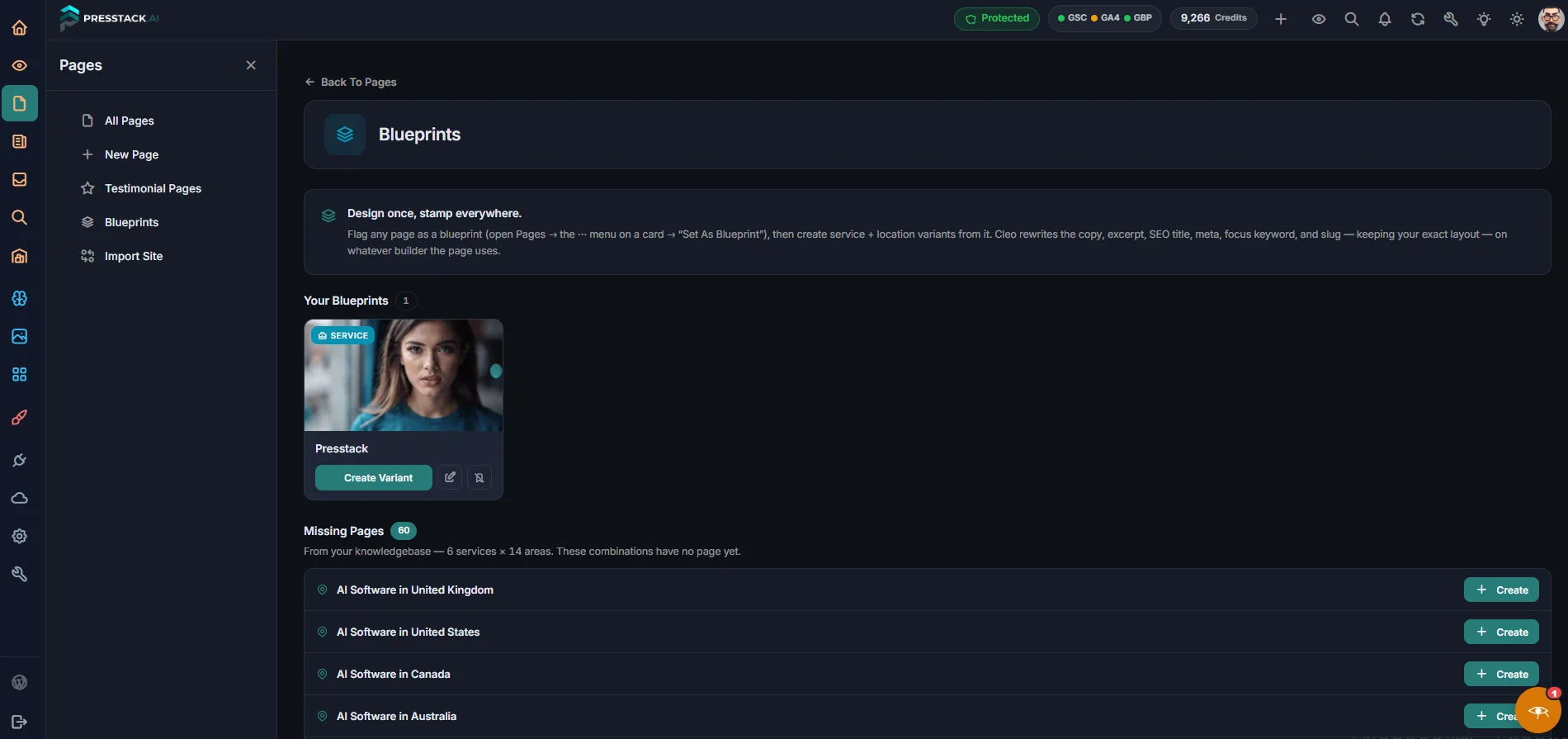
New Blueprint

The Page You Built

An ordinary page, designed however you like in Elementor. Nothing marks it as a blueprint until you say so from the page list.

Mark It As a Blueprint

You do this from the page card on your list of pages. The original stays a normal live page. Editing it later does not alter pages already stamped from it.

Tell Cleo What You Need

A small prompt appears. You describe the page in plain words, which town, which service, anything specific to include. She builds it using that and your Knowledgebase.

The Structure Stays Fixed

Every stamped page carries the same layout as the one you designed. Cleo changes what is inside the sections, not the sections themselves.

Add More Any Time

Need two more towns next month? They get the same layout, matching every page already stamped from that blueprint.

Building Pages

What Cleo Does, and What She Calls It.

Blueprints and page building work in both Presstack Core and Presstack Theme, and in whichever page builder you already use. Writing page copy uses credits. Cleo shows the cost of a run before you confirm it, including for a batch, so twelve pages is costed before it starts rather than after.

What It Does Plain English
Building
Build a page from a description Tell her what it is for and what goes on it. Built in your page builder.
Rewrite the words on a page The layout is untouched. Draft shown first.
Stamp a page from a blueprint Your layout, filled from your instruction and the Knowledgebase.
Bring a page up to date Refreshes what is out of date rather than starting again.
Blueprints
See your blueprints The layouts you have marked, and what has been stamped from each.
Repurpose a page you already have The layout you built for one service becomes the start of the next.
Checking
Check a page over Four checks run before she considers it finished.
Check it persuades Whether it makes a case, not just a description.
Check the next step is clear Whether somebody knows what to do at the bottom.
Check it is not a near-duplicate She refuses to publish a page too close to one you already have.
Keeping Track
List your pages, with how each is doing So the quiet failures are visible.
Done By Hand, Or Done By Cleo

Building pages across forty locations, keeping every one distinct.

The standard objection to bulk page building is that you end up with near-identical pages. Cleo compares every candidate against the pages already on the site before it publishes, so the objection is answered before the page exists.

Done By Hand With Cleo
Designing the layout Open each image, look at it, type a sentence. Press one button, or do it unattended
Keeping every stamped page consistent Nobody does this The same button again
Writing copy that differs per town The first fifty are good, the last fifty say "photo" The two hundredth is like the first
Catching near-duplicates You'll probably forget Caught and described
Knowing which pages you still need Search the library, give up, use a stock site Your own library searched first, then use AI in one click
Changing something across forty pages A stock subscription, or a separate tool One Click AI
Seeing what a change looks like first A compression plugin taking over everything Found individually, with the page they're on
Knowing which pages are working Re-upload from wherever the original is One click. The original was kept
Adding two more towns next month Not practically possible by hand Listed, including ones inside your page builder
Bulk changes across many pages Permanent, and you'd better be right A bin. Bring it back if you were wrong
Get Started
In More Detail

What sits alongside page building inside Presstack.

The Knowledgebase

Every page Cleo builds draws on the services and areas stored in your Knowledgebase. The more complete it is before you start, the less you have to specify each time you ask for a new page.

Knowledgebase

Writing And Content

The same duplication check that governs pages governs articles too. A piece of content that is too close to something already published does not get through, regardless of where it sits on the site.

Writing

Getting Found On Google

Each new page is a potential entry point from search. Whether it becomes one depends on whether it says something distinct, and that is precisely what the duplicate check is running.

Getting Found

Pro Widgets

Pages built from a blueprint still need the right components on them. Pro Widgets gives you the elements that carry the content once the page structure exists.

Pro Widgets
Before You Ask

Frequently Asked Questions

  • No. The level of support depends on which builder you use, and Cleo is honest about that upfront.

    On Elementor and WPBakery she builds new pages and repurposes existing ones, placing copy into the layout rather than alongside it. On Gutenberg, Divi and Avada she rewrites the words without touching the structure, and you see a before-and-after before anything changes. The blueprint system works across both Presstack Core and Presstack Theme.

    If you are not sure which applies to your setup, open the page builder settings in Presstack and it tells you the mode it is running in.

    Using Elementor's AI connector? See Presstack vs Elementor MCP.

The Quickest Thing To Try

See Which Pages You Are Missing Before You Build Anything.

Connect your site, open the missing pages list, and the gaps between your Knowledgebase and your published pages are there in front of you.

Two days free, with 100 credits to spend.